
In KUSANAGI, Nginx and Apache HTTP Server can be selected for Web Server.
Also, it is possible to combine them for the Web server configuration.
In this document, each Web server configurations are described.
- "nginx reverse proxy + nginx" mode
- "nginx reverse proxy + httpd" mode
- "nginx reverse proxy + production nginx + staging nginx" mode
- "nginx reverse proxy + production php + staging php" mode
Differences between Web Server Configurations
The differences of available features in each Web server configurations are shown in the table.
For the detail of each features, refer the document below or refer the corresponding kusanagi command.
| Normal Operation | During SafeUpgrade | |||
|---|---|---|---|---|
| Nginx Deployment | Apache HTTP Server Deployment | SafeUpgrade for Nginx | SafeUpgrade for PHP | |
| Feature | 1. "nginx reverse proxy + nginx" mode | 2. "nginx reverse proxy + httpd" mode | 3. "nginx reverse proxy + production nginx + staging nginx" mode | 4. "nginx reverse proxy + production php + staging php" mode |
| bcache | Available in WordPress profiles | Available in WordPress profiles | Available in WordPress profiles | Available in WordPress profiles |
| fcache | Available in all profiles | Available in all profiles1 | Available in all profiles | Available in all profiles |
| ratelimit | Available in all profiles | Available in all profiles | Available in all profiles | Available in all profiles |
| .htaccess file | Unavailable | Available in all profiles | Unavailable | Unavailable |
| HTTP/3 | Available in all profiles | Available in all profiles | Available in all profiles | Available in all profiles |
| WAF | NAXSI is used | mod_security is used | NAXSI is used | NAXSI is used |
| SafeUpgrade of middleware | Unavailable | Unavailable | SafeUpgrade of nginx version is available | SafeUpgrade of php version is available |
Specify and Change Web Server Configuration
Initialize Web Server Configuration
Specifying Web Server Configuration can be done with kusanagi init command and corresponding kusanagi commands.
3. "nginx reverse proxy + production nginx + staging nginx" mode and 4. "nginx reverse proxy + production php + staging php" mode cannot be specified by kusanagi init command. After initialized with 1. "nginx reverse proxy + nginx" mode execute corresponding kusanagi command to change Web server configuration.
| Normal Operation | During SafeUpgrade | |||
|---|---|---|---|---|
| Nginx Deployment | Apache HTTP Server Deployment | SafeUpgrade for Nginx | SafeUpgrade for PHP | |
| kusanagi command | 1. "nginx reverse proxy + nginx" mode | 2. "nginx reverse proxy + httpd" mode | 3. "nginx reverse proxy + production nginx + staging nginx" mode | 4. "nginx reverse proxy + production php + staging php" mode |
| kusanagi init command | --nginxXXX option (XXX will contain the version) | --httpdXX option (XX will contain the version) | (Cannot be specified with kusanagi init command) | (Cannot be specified with kusanagi init command) |
| Correspinding kusanagi command | kusanagi nginx command | kusanagi httpd command | kusanagi proxy command | kusanagi proxy command |
Change and Restart Web Server Configuration
When running in one Web server configuration, you can change the Web server configuration by executing the kusanagi command corresponding to another Web server configuration. For example, when the web server configuration is running in 1. "nginx reverse proxy + nginx" mode, executing the kusanagi httpd command will change it to 2. "nginx reverse proxy + httpd" mode.
When a Web server configuration is running, executing the corresponding kusanagi command will restart each web server while maintaining that configuration. For example, if the Web server configuration is running in 1. "nginx reverse proxy + nginx" mode, executing kusanagi nginx will restart all Web servers running in 1. "nginx reverse proxy + nginx" mode.
| Normal Operation | During SafeUpgrade | |||
|---|---|---|---|---|
| Nginx Deployment | Apache HTTP Server Deployment | SafeUpgrade for Nginx | SafeUpgrade for PHP | |
| kusanagi command | 1. "nginx reverse proxy + nginx" mode | 2. "nginx reverse proxy + httpd" mode | 3. "nginx reverse proxy + production nginx + staging nginx" mode | 4. "nginx reverse proxy + production php + staging php" mode |
| kusanagi nginx command | Restart | Change to 1. "nginx reverse proxy + nginx" mode | Change to 1. "nginx reverse proxy + nginx" mode | Change to 1. "nginx reverse proxy + nginx" mode |
| kusanagi httpd command | Change to 2. "nginx reverse proxy + httpd" mode | Restart | Change to 2. "nginx reverse proxy + httpd" mode | Change to 2. "nginx reverse proxy + httpd" mode |
| kusanagi proxy command | Change to 3. "nginx reverse proxy + production nginx + staging nginx" mode | Change to 3. "nginx reverse proxy + production nginx + staging nginx" mode | Restart Web servers | Restart Web servers |
| kusanagi php command | Restart php | Restart php | Restart php | Restart php |
For each kusanagi command, when restarting the Web server or modifying its configuration, the system tests the configuration files and performs the restart or modification only if no errors are found. If errors are detected in the configuration files, the system does not perform the restart or modification and continues to operate the Web server with its current configuration.
Reload Web Server Configuration
You can reload all the Web server configuration files by executing each kusanagi command with the --reload option. During this process, the configuration files are tested, and reloading occurs only if no errors are found. If errors are detected in the configuration files, reloading is not performed, and the current Web server configuration continues unchanged.
Test Configuration Files of Web Server Configuration
You can test all the Web server configuration files by executing each kusanagi command with the --test option.
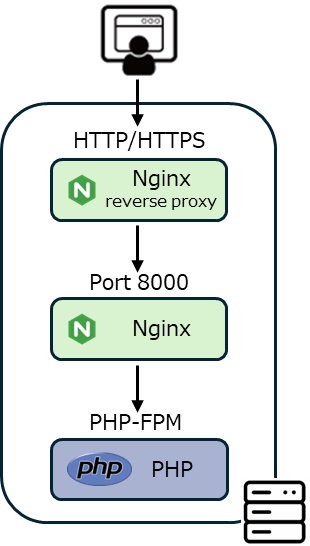
1. "nginx reverse proxy +nginx" Mode
This mode operates with Nginx as a reverse proxy, running another Nginx behind it.
Nginx of reverse proxy accepts requests on ports 80/443 and reverse proxies them to another Nginx.
Another Nginx accepts requests on port 8000 and executes PHP processing via php-fpm.
CGI (perl) similarly accepts requests and executes processing via fcgiwrap.
The WordPress profile can utilize bcache. Additionally, fcache, ratelimit, and HTTP/3 are available in all profiles.
The Nginx service name of reverse proxy is nginxXXX@proxy (XXX is the version number).
The Nginx service name is nginxXXX@production (XXX is the version number).
Verify Status
kusanagi status command displays the following.
*** (active) nginx : nginx129@proxy ***
* nginx129@proxy.service - The NGINX HTTP and reverse proxy server (proxy)
Loaded: loaded (/usr/lib/systemd/system/nginx129.service; enabled; vendor preset: disabled)
Active: active (running) since Wed 2025-08-06 10:24:07 JST; 6 days ago

*** (active) nginx : nginx129@production ***
* nginx129@production.service - The NGINX HTTP and reverse proxy server (production)
Loaded: loaded (/usr/lib/systemd/system/nginx129.service; enabled; vendor preset: disabled)
Active: active (running) since Wed 2025-08-06 10:24:07 JST; 6 days ago
Location of Logs
- /home/kusanagi/PROFILE/log/nginx
- http is logged to access.log/error.log.
- https is loged to ssl_access.log/ssl_error.log.
- /var/opt/kusanagi/log/nginxXXX (XXX is the version number)
Location of Configuration Files
- Common configuration files of nginx
- /etc/opt/kusanagi/nginx/conf.d
- This is the configuration file that serves as a template for all settings.
- /etc/opt/kusanagi/nginxXXX/conf.d (XXX is the version number)
- This is a configuration file managed by the middleware. Do not update it directly, as it is updated during middleware version updates and similar procedures.
- /etc/opt/kusanagi/nginx/conf.d
- nginx reverse proxy
- /etc/opt/kusanagi/nginx/conf.proxy.d
- It is automatically generated from the configuration file in /etc/opt/kusanagi/nginx/conf.d. Therefore, please do not update it directly.
- /etc/opt/kusanagi/nginxXXX/conf.proxy.d (XXX is the version number)
- This is a configuration file managed by the middleware. Do not update it directly, as it is updated during middleware version updates and similar procedures.
- /etc/opt/kusanagi/nginx/conf.proxy.d
- nginx
- /etc/opt/kusanagi/nginx/conf.production.d
- It is automatically generated from the configuration file in /etc/opt/kusanagi/nginx/conf.d. Therefore, please do not update it directly.
- /etc/opt/kusanagi/nginxXXX/conf.production.d (XXX is the version number)
- This is a configuration file managed by the middleware. Do not update it directly, as it is updated during middleware version updates and similar procedures.
- /etc/opt/kusanagi/nginx/conf.production.d
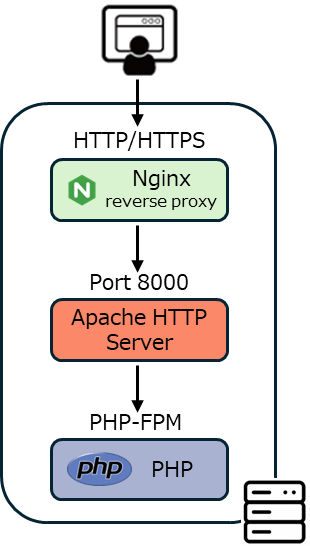
2. "nginx reverse proxy + httpd" Mode
This mode operates with Nginx as a reverse proxy, running Apache HTTP Server behind it.
It combines fcache, supported only by Nginx, with Apache HTTP Server-specific features like .htaccess files.
Nginx of reverse proxy accepts requests on ports 80/443 and reverse proxies them to Apache HTTP Server.
The Apache HTTP Server accepts requests on port 8000 and executes PHP processing via php-fpm.
CGI (perl) similarly accepts requests and executes processing via fcgiwrap.
The WordPress profile can utilize bcache. Additionally, fcache, ratelimit, and HTTP/3 are available in all profiles.
There is a note regarding fcache: If you are restricting access based on IP addresses or similar in your .htaccess file, please either disable fcache or configure it not to cache. This restriction is the same as with typical CDNs.
The Nginx service name of reverse proxy is nginxXXX@proxy (XXX is the version number).
The Apache HTTP Server service name is httpdXX@production (XX is the version number).
Verify Status
kusanagi status command displays the following.
*** (active) nginx : nginx129 ***
* nginx129@proxy.service - The NGINX HTTP and reverse proxy server (proxy)
Loaded: loaded (/usr/lib/systemd/system/nginx129@.service; enabled; vendor preset: disabled)
Active: active (running) since Wed 2025-08-06 10:24:07 JST; 6 days ago

*** (active) httpd : httpd24 ***
* httpd@production.service - The Apache HTTP Server (production)
Loaded: loaded (/usr/lib/systemd/system/httpd@.service; enabled; vendor preset: disabled)
Active: active (running) since Wed 2025-08-06 10:24:07 JST; 6 days ago
Location of Logs
- nginx reverse proxy
- /home/kusanagi/PROFILE/log/nginx
- http is logged to access.log/error.log.
- https is loged to ssl_access.log/ssl_error.log.
- /var/opt/kusanagi/log/nginxXXX (XXX is the version number)
- /home/kusanagi/PROFILE/log/nginx
- httpd
- /home/kusanagi/PROFILE/log/httpd
- Regardress of http/https, all logged to access.log/error.log.
- /var/opt/kusanagi/log/httpdXX (XX is the version number)
- /home/kusanagi/PROFILE/log/httpd
Location of Configuration Files
- Common configuration files of nginx
- /etc/opt/kusanagi/nginx/conf.d
- This is the configuration file that serves as a template for all settings.
- /etc/opt/kusanagi/nginxXXX/conf.d (XXX is the version number)
- This is a configuration file managed by the middleware. Do not update it directly, as it is updated during middleware version updates and similar procedures.
- /etc/opt/kusanagi/nginx/conf.d
- Common configuration files of httpd
- /etc/opt/kusanagi/httpd/conf.d
- This is the configuration file that serves as a template for all settings.
- /etc/opt/kusanagi/httpdXX/conf.d (XX is the version number)
- This is a configuration file managed by the middleware. Do not update it directly, as it is updated during middleware version updates and similar procedures.
- /etc/opt/kusanagi/httpd/conf.d
- nginx reverse proxy
- /etc/opt/kusanagi/nginx/conf.proxy.d
- It is automatically generated from the configuration file in /etc/opt/kusanagi/nginx/conf.d. Therefore, please do not update it directly.
- /etc/opt/kusanagi/nginxXXX/conf.proxy.d (XXX is the version number)
- This is a configuration file managed by the middleware. Do not update it directly, as it is updated during middleware version updates and similar procedures.
- /etc/opt/kusanagi/nginx/conf.proxy.d
- httpd
- /etc/opt/kusanagi/httpd/conf.production.d
- It is automatically generated from the configuration file in /etc/opt/kusanagi/httpd/conf.d. Therefore, please do not update it directly.
- /etc/opt/kusanagi/httpdXX/conf.production.d (XX is the version number)
- This is a configuration file managed by the middleware. Do not update it directly, as it is updated during middleware version updates and similar procedures.
- /etc/opt/kusanagi/httpd/conf.production.d
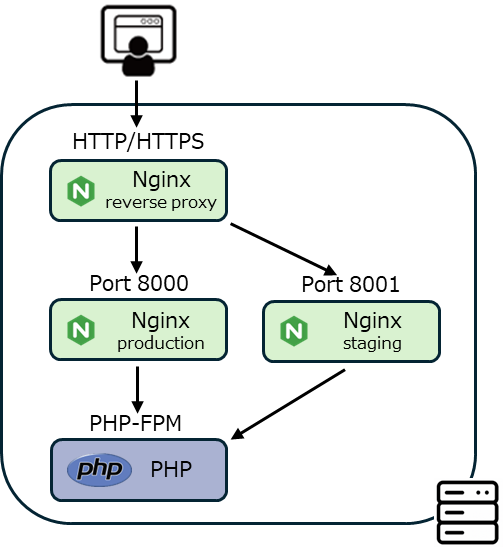
3. "nginx reverse proxy + production nginx + staging nginx" Mode
This mode operates with Nginx functioning as a reverse proxy, with multiple additional Nginx instances running behind it.
By using a production Nginx and a staging Nginx with different versions, you can perform SafeUpgrade while running production on the current version and staging on a different version.
Nginx of reverse proxy accepts requests on ports 80/443 and reverse proxies them to production Nginx and staging Nginx.
Nginx of production accepts requests on port 8000 and executes PHP processing via php-fpm.
Nginx of staging accepts requests on port 8001 and executes PHP processing via php-fpm.
CGI (perl) similarly accepts requests and executes processing via fcgiwrap.
The WordPress profile can utilize bcache. Additionally, fcache, ratelimit, and HTTP/3 are available in all profiles.
The production nginx and the staging nginx are load balanced with a 5:1 weighting.
To explicitly access the production nginx, specify X-Production: on in the HTTP header of the HTTP request.
To explicitly access the staging nginx, specify X-Staging: on in the HTTP header of the HTTP request.
The Nginx service name of reverse proxy is nginxXXX@proxy (XXX is the version number).
The Nginx service name of production is nginxXXX@production (XXX is the version number).
The Nginx service name of staging is nginxXXX@staging (XXX is the version number).
Verify Status
kusanagi status command displays the following.
In the following example, the Nginx version in production is 1.27, and the Nginx version in staging is 1.29.
*** (active) nginx : nginx129@staging ***
* nginx129@staging.service - The NGINX HTTP and reverse proxy server (staging)
Loaded: loaded (/usr/lib/systemd/system/nginx129@.service; enabled; preset: disabled)
Active: active (running) since Fri 2025-08-08 12:29:07 JST; 4 days ago

*** (active) nginx : nginx127@proxy ***
* nginx127@proxy.service - The NGINX HTTP and reverse proxy server (proxy)
Loaded: loaded (/usr/lib/systemd/system/nginx127@.service; enabled; preset: disabled)
Active: active (running) since Fri 2025-08-08 12:29:07 JST; 4 days ago

*** (active) nginx : nginx127@production ***
* nginx127@production.service - The NGINX HTTP and reverse proxy server (production)
Loaded: loaded (/usr/lib/systemd/system/nginx127@.service; enabled; preset: disabled)
Active: active (running) since Fri 2025-08-08 12:29:08 JST; 4 days ago
Location of Logs
- nginx reverse proxy
- /home/kusanagi/PROFILE/log/nginx
- http is logged to access.log/error.log.
- https is loged to ssl_access.log/ssl_error.log.
- /var/opt/kusanagi/log/nginxXXX (XXX is the version number)
- /home/kusanagi/PROFILE/log/nginx
- production nginx
- /home/kusanagi/PROFILE/log/nginx
- Regardress of http/https, all logged to access.log/error.log.
- /var/opt/kusanagi/log/nginxXXX (XXX is the version number)
- /home/kusanagi/PROFILE/log/nginx
- staging nginx
- /home/kusanagi/PROFILE/log/nginx
- Regardress of http/https, all logged to staging_access.log/staging_error.log.
- /var/opt/kusanagi/log/nginxXXX (XXX is the version number)
- /home/kusanagi/PROFILE/log/nginx
Location of Configuration Files
- Common configuration files of nginx
- /etc/opt/kusanagi/nginx/conf.d
- This is the configuration file that serves as a template for all settings.
- /etc/opt/kusanagi/nginxXXX/conf.d (XXX is the version number)
- This is a configuration file managed by the middleware. Do not update it directly, as it is updated during middleware version updates and similar procedures.
- /etc/opt/kusanagi/nginx/conf.d
- nginx reverse proxy
- /etc/opt/kusanagi/nginx/conf.proxy.d
- It is automatically generated from the configuration file in /etc/opt/kusanagi/nginx/conf.d. Therefore, please do not update it directly.
- /etc/opt/kusanagi/nginxXXX/conf.proxy.d (XXX is the version number)
- This is a configuration file managed by the middleware. Do not update it directly, as it is updated during middleware version updates and similar procedures.
- /etc/opt/kusanagi/nginx/conf.proxy.d
- production nginx
- /etc/opt/kusanagi/nginx/conf.production.d
- It is automatically generated from the configuration file in /etc/opt/kusanagi/nginx/conf.d. Therefore, please do not update it directly.
- /etc/opt/kusanagi/nginxXXX/conf.production.d (XXX is the version number)
- This is a configuration file managed by the middleware. Do not update it directly, as it is updated during middleware version updates and similar procedures.
- /etc/opt/kusanagi/nginx/conf.production.d
- staging nginx
- /etc/opt/kusanagi/nginx/conf.staging.d
- It is automatically generated from the configuration file in /etc/opt/kusanagi/nginx/conf.d. Therefore, please do not update it directly.
- /etc/opt/kusanagi/nginxXXX/conf.staging.d (XXX is the version number)
- This is a configuration file managed by the middleware. Do not update it directly, as it is updated during middleware version updates and similar procedures.
- /etc/opt/kusanagi/nginx/conf.staging.d
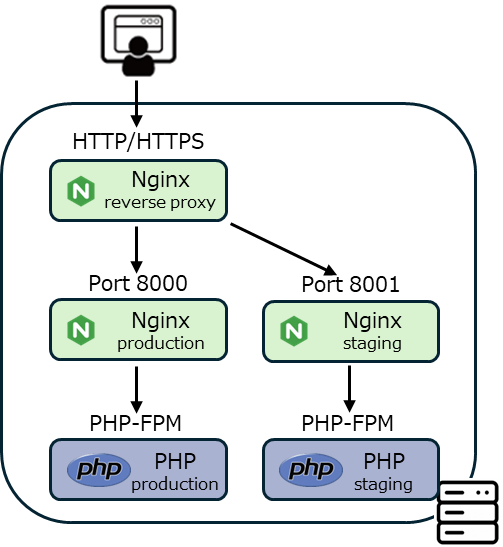
4. "nginx reverse proxy + production php + staging php" Mode
This mode operates with Nginx functioning as a reverse proxy, with multiple additional Nginx and PHP instances running behind it.
By using a production php and a staging php with different versions, you can perform SafeUpgrade while running production on the current version and staging on a different version.
Nginx of reverse proxy accepts requests on ports 80/443 and reverse proxies them to production Nginx and staging Nginx.
Nginx of production accepts requests on port 8000 and executes PHP processing via production php-fpm.
Nginx of staging accepts requests on port 8001 and executes PHP processing via staging php-fpm.
CGI (perl) similarly accepts requests and executes processing via fcgiwrap.
The WordPress profile can utilize bcache. Additionally, fcache, ratelimit, and HTTP/3 are available in all profiles.
The production nginx and the staging nginx are load balanced with a 5:1 weighting.
To explicitly access the production nginx, specify X-Production: on in the HTTP header of the HTTP request.
To explicitly access the staging nginx, specify X-Staging: on in the HTTP header of the HTTP request.
The Nginx service name of reverse proxy is nginxXXX@proxy (XXX is the version number).
The Nginx service name of production is nginxXXX@production (XXX is the version number).
The Nginx service name of staging is nginxXXX@staging (XXX is the version number).
The php-fpm service name of production is phpXX-fpm (XX is the version number). (NOTE: php-fpm does not have @production)
The php-fpm service name of staging is php-fpmXX@staging (XX is the version number).
Verify Status
kusanagi status command displays the following.
In the following example, the Nginx version is 1.27, the PHP version in production is 8.3, and the PHP version in staging is 8.5.
*** (active) nginx : nginx129@proxy ***
* nginx129@proxy.service - The NGINX HTTP and reverse proxy server (proxy)
     Loaded: loaded (/usr/lib/systemd/system/nginx129@.service; enabled; preset: disabled)
     Active: active (running) since Fri 2025-08-08 12:29:07 JST; 4 days ago

*** (active) nginx : nginx129@production ***
* nginx129@production.service - The NGINX HTTP and reverse proxy server (production)
     Loaded: loaded (/usr/lib/systemd/system/nginx129@.service; enabled; preset: disabled)
     Active: active (running) since Fri 2025-08-08 12:29:08 JST; 4 days ago

*** (active) nginx : nginx129@staging ***
* nginx129@staging.service - The NGINX HTTP and reverse proxy server (staging)
     Loaded: loaded (/usr/lib/systemd/system/nginx129@.service; enabled; preset: disabled)
     Active: active (running) since Fri 2025-08-08 12:29:07 JST; 4 days ago

*** (active) php : php85-fpm@staging ***
* php85-fpm@staging.service - The PHP 8.5 FastCGI Process Manager
     Loaded: loaded (/usr/lib/systemd/system/php85-fpm@.service; enabled; preset: disabled)
     Active: active (running) since Fri 2025-08-08 12:29:07 JST; 4 days ago

*** (active) php : php83-fpm ***
* php83-fpm.service - The PHP 8.3 FastCGI Process Manager
     Loaded: loaded (/usr/lib/systemd/system/php83-fpm.service; enabled; preset: disabled)
     Active: active (running) since Fri 2025-08-08 12:29:07 JST; 4 days ago
Location of Logs
- nginx reverse proxy
- /home/kusanagi/PROFILE/log/nginx
- http is logged to access.log/error.log.
- https is loged to ssl_access.log/ssl_error.log.
- /var/opt/kusanagi/log/nginxXXX (XXX is the version number)
- /home/kusanagi/PROFILE/log/nginx
- production nginx
- /home/kusanagi/PROFILE/log/nginx
- Regardress of http/https, all logged to access.log/error.log.
- /var/opt/kusanagi/log/nginxXXX (XXX is the version number)
- /home/kusanagi/PROFILE/log/nginx
- staging nginx
- /home/kusanagi/PROFILE/log/nginx
- Regardress of http/https, all logged to staging_access.log/staging_error.log.
- /var/opt/kusanagi/log/nginxXXX (XXX is the version number)
- /home/kusanagi/PROFILE/log/nginx
- production php
- /var/opt/kusanagi/log/phpXX-fpm (XX is the version number)
- staging php
- /var/opt/kusanagi/log/phpXX-fpm (XX is the version number)
Location of Configuration Files
- Common configuration files of nginx
- /etc/opt/kusanagi/nginx/conf.d
- This is the configuration file that serves as a template for all settings.
- /etc/opt/kusanagi/nginxXXX/conf.d (XXX is the version number)
- This is a configuration file managed by the middleware. Do not update it directly, as it is updated during middleware version updates and similar procedures.
- /etc/opt/kusanagi/nginx/conf.d
- nginx reverse proxy
- /etc/opt/kusanagi/nginx/conf.proxy.d
- It is automatically generated from the configuration file in /etc/opt/kusanagi/nginx/conf.d. Therefore, please do not update it directly.
- /etc/opt/kusanagi/nginxXXX/conf.proxy.d (XXX is the version number)
- This is a configuration file managed by the middleware. Do not update it directly, as it is updated during middleware version updates and similar procedures.
- /etc/opt/kusanagi/nginx/conf.proxy.d
- production nginx
- /etc/opt/kusanagi/nginx/conf.production.d
- It is automatically generated from the configuration file in /etc/opt/kusanagi/nginx/conf.d. Therefore, please do not update it directly.
- /etc/opt/kusanagi/nginxXXX/conf.production.d (XXX is the version number)
- This is a configuration file managed by the middleware. Do not update it directly, as it is updated during middleware version updates and similar procedures.
- /etc/opt/kusanagi/nginx/conf.production.d
- staging nginx
- /etc/opt/kusanagi/nginx/conf.staging.d
- It is automatically generated from the configuration file in /etc/opt/kusanagi/nginx/conf.d. Therefore, please do not update it directly.
- /etc/opt/kusanagi/nginxXXX/conf.staging.d (XXX is the version number)
- This is a configuration file managed by the middleware. Do not update it directly, as it is updated during middleware version updates and similar procedures.
- /etc/opt/kusanagi/nginx/conf.staging.d
- production php
- /etc/opt/kusanagi/phpXX.d (XX is the version number)
- This is a configuration file managed by the middleware. Do not update it directly, as it is updated during middleware version updates and similar procedures.
- /etc/opt/kusanagi/phpXX.d (XX is the version number)
- staging php
- /etc/opt/kusanagi/phpXX.d (XX is the version number)
- This is a configuration file managed by the middleware. Do not update it directly, as it is updated during middleware version updates and similar procedures.
- /etc/opt/kusanagi/phpXX.d (XX is the version number)
Summary of Service Names
| Normal Operation | During SafeUpgrade | |||
|---|---|---|---|---|
| Nginx Deployment | Apache HTTP Server Deployment | SafeUpgrade for Nginx | SafeUpgrade for PHP | |
| Service Names | 1. "nginx reverse proxy + nginx" mode | 2. "nginx reverse proxy + httpd" mode | 3. "nginx reverse proxy + production nginx + staging nginx" mode | 4. "nginx reverse proxy + production php + staging php" mode |
| nginxXXX@proxy | ✓ | ✓ | ✓ | ✓ |
| nginxXXX@production | ✓ | - | ✓ | ✓ |
| nginxXXX@staging | - | - | ✓ | ✓ |
| httpdXX@production | - | ✓ | - | - |
| phpXX-fpm | ✓ | ✓ | ✓ | ✓ |
| phpXX-fpm@staging | - | - | - | ✓ |
Summary of Log Locations
| Normal Operation | During SafeUpgrade | |||
|---|---|---|---|---|
| Nginx Deployment | Apache HTTP Server Deployment | SafeUpgrade for Nginx | SafeUpgrade for PHP | |
| Path of Log Locations | 1. "nginx reverse proxy + nginx" mode | 2. "nginx reverse proxy + httpd" mode | 3. "nginx reverse proxy + production nginx + staging nginx" mode | 4. "nginx reverse proxy + production php + staging php" mode |
| /home/kusanagi/PROFILE/log/nginx | ✓ | ✓ | ✓ | ✓ |
| /var/opt/kusanagi/log/nginxXXX | ✓ | ✓ | ✓ | ✓ |
| /home/kusanagi/PROFILE/log/httpd | - | ✓ | - | - |
| /var/opt/kusanagi/log/httpdXX | - | ✓ | - | - |
| /var/opt/kusanagi/log/phpXX-fpm | ✓ | ✓ | ✓ | ✓ |
Summary of Configuration Files Locations
| Normal Operation | During SafeUpgrade | ||||
|---|---|---|---|---|---|
| Nginx Deployment | Apache HTTP Server Deployment | SafeUpgrade for Nginx | SafeUpgrade for PHP | ||
| Path of Configuration Files Locations | 1. "nginx reverse proxy + nginx" mode | 2. "nginx reverse proxy + httpd" mode | 3. "nginx reverse proxy + production nginx + staging nginx" mode | 4. "nginx reverse proxy + production php + staging php" mode | Notes |
| nginx/conf.d | ✓ | ✓ | ✓ | ✓ | Editable |
| nginxXXX/conf.d | ✓ | ✓ | ✓ | ✓ | Updated during version updates |
| nginx/conf.proxy.d | ✓ | ✓ | ✓ | ✓ | Automatically generated from nginx/conf.d |
| nginxXXX/conf.proxy.d | ✓ | ✓ | ✓ | ✓ | Updated during version updates |
| nginx/conf.production.d | ✓ | - | ✓ | ✓ | Automatically generated from nginx/conf.d |
| nginxXXX/conf.production.d | ✓ | - | ✓ | ✓ | Updated during version updates |
| nginx/conf.staging.d | - | - | ✓ | ✓ | Automatically generated from nginx/conf.d |
| nginxXXX/conf.staging.d | - | - | ✓ | ✓ | Updated during version updates |
| httpd/conf.d | - | ✓ | - | - | Editable |
| httpdXX/conf.d | - | ✓ | - | - | Updated during version updates |
| httpd/conf.production.d | - | ✓ | - | - | Automatically generated from httpd/conf.d |
| httpdXX/conf.production.d | - | ✓ | - | - | Updated during version updates |
| phpXX.d | ✓ | ✓ | ✓ | ✓ | Updated during version updates |
| phpXX-fpm.d | ✓ | ✓ | ✓ | ✓ | Updated during version updates |
- If you are restricting access based on IP addresses or similar criteria in your .htaccess file, please configure it to either disable fcache or prevent caching. ↩︎


